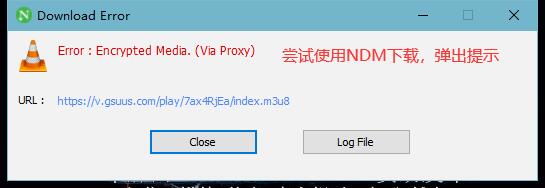
有的时候我们需要下载加密的流媒体,而市面上很多下载器是不支持下载加密的流媒体的。所以我通过Java的方式来下载这种流媒体并解密。
例如以下的一个例子: 示例网页
 网页示例NDM下载示例
准备工作
- 具有加密的流媒体的网页 例如:以上示例的网页
- JDK 文章使用Graal JDK 17.0.11
- IDE
获取加密媒体的m3u8 URL
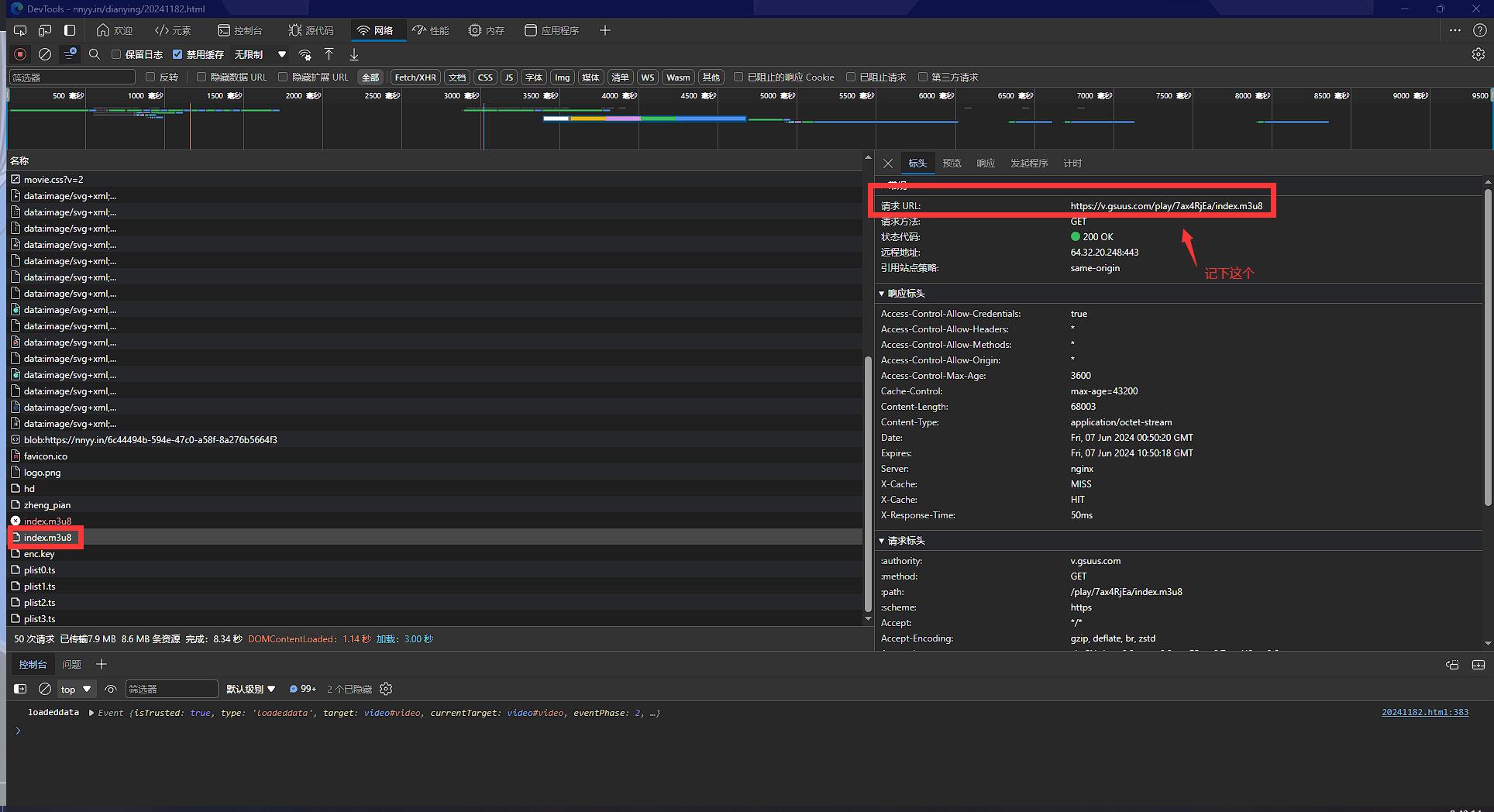
先打开具有加密流媒体的网页,然后按F12打开开发人员工具,转到“网络”一栏,然后刷新网页或按下Ctrl+R。
在刷新的列表中尝试找到对应的m3u8文件,然后记下它的URL。
开发人员工具-寻找m3u8文件当然,也可以在这里选择预览m3u8文件的内容。
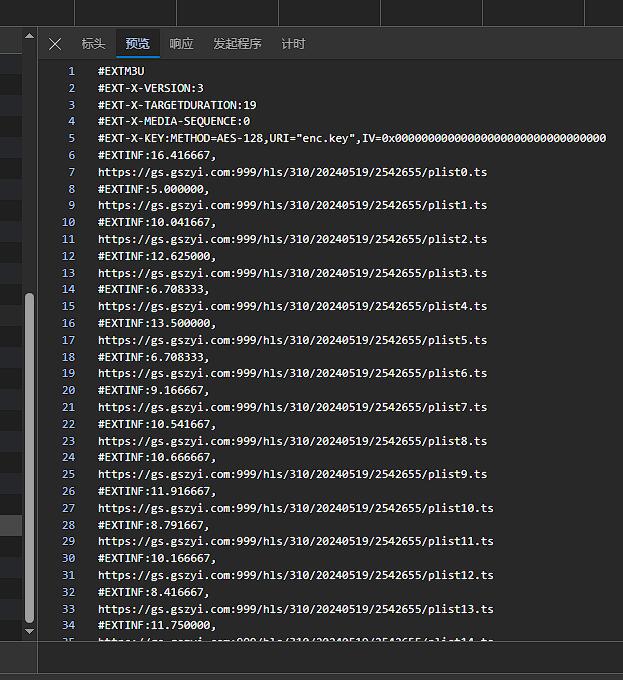
m3u8预览我们需要的内容只有里面所有的链接(https://xxx.xxx/xxx.ts)以及文件最上面的#EXT-X-MEDIA-SEQUENCE和#EXT-X-KEY两行的内容。链接由于太多了,我们选择使用Java来帮我们获取,而#EXT-X-MEDIA-SEQUENCE和#EXT-X-KEY的内容可以选择在这里直接记下来,也可以使用Java来获取。
仅当m3u8文件中不存在IV=xxx...时才使用#EXT-X-MEDIA-SEQUENCE的值来充当IV值。如果IV值本身存在,则后面不需要#EXT-X-MEDIA-SEQUENCE的值。
IV值必须为16个数字,如果不符合请取前16位(如果多于16位)或在后面补0(如果少于16位)
获取m3u8文件内容
简单来说,只需要请求刚才获取的URL,就能返回我们所需要的m3u8文件内容。一个示例如下:
1
2
3
4
5
6
7
8
9
10
11
12
13
14
15
16
| import java.net.HttpURLConnection;
import java.net.URL;
public void get_m3u8_content() {
URL m3u8_url = new URL("https://v.gsuus.com/play/7ax4RjEa/index.m3u8");
ArrayList<String> m3u8_contents = new ArrayList<>();
HttpURLConnection m3u8_con = (HttpURLConnection) m3u8_url.openConnection();
m3u8_con.setRequestMethod("GET");
BufferedReader in = new BufferedReader(new InputStreamReader(m3u8_con.getInputStream()));
String inputLine;
while ((inputLine = in.readLine()) != null) m3u8_contents.add(inputLine);
in.close();
m3u8_con.disconnect();
}
|
如果网络连接需要使用代理,以上示例中的m3u8_con对象可以这么创建。
1
2
3
4
5
6
7
| import java.net.HttpURLConnection;
import java.net.URL;
import java.net.Proxy;
Proxy proxy = new Proxy("localhost", 7890);
URL m3u8_url = new URL("https://v.gsuus.com/play/7ax4RjEa/index.m3u8");
HttpURLConnection m3u8_con = (HttpURLConnection) m3u8_url.openConnetion(proxy);
|
获取到文件内容之后,我们开始筛选有用信息。首先观察文件内容,会发现除了链接之外,所有的内容前面都有个#EXT。既然如此,我们就可以筛选出所有链接了。以下为通过遍历筛选的示例:
1
2
3
4
5
6
7
8
9
10
11
12
13
14
| import java.net.URL;
import java.util.ArrayList;
public void getURL() {
ArrayList<URL> m3u8_contents = new ArrayList<>();
ArrayList ts_URL = new ArrayList();
for (int i = 0; i < m3u8_contents.size(); i++) {
if (!m3u8_contents.get(i).startsWith("#EXT")) {
ts_URL.add(new URL(m3u8_contents.get(i)));
}
}
}
|
类似地,我们也能筛选出#EXT-X-MEDIA-SEQUENCE和#EXT-X-KEY的内容,这里就不加示例了(下面的最终示例包含此部分)。
获取key
在#EXT-X-KEY一行中通常有一个URI="xxx.key"的内容,根据它来获取key文件。你可以在刚才的开发人员工具里找到浏览器获取的这个文件并记下文件内容,也可以使用Java。使用Java获取key的方法与获取m3u8文件的方法类似,故不贴出示例。
以下为key文件的预览。
预览key文件多线程下载ts文件
这里我们为了加快下载速度,可以使用多线程并发下载文件,以下为一个例子(CPU为英特尔志强E5-2660(2颗),并发线程数请根据自己情况调整)。
1
2
3
4
5
6
7
8
9
10
11
12
13
14
15
16
17
18
19
20
21
22
23
24
25
26
27
28
29
30
31
32
33
34
| import java.io.File;
import java.net.URLConnection;
import java.net.URL;
import java.util.ArrayList;
import java.util.concurrent.ExecutorService;
import java.util.concurrent.Executors;
public void download() {
ExecutorService pool = Executors.newFixedThreadPool(512);
File download_cache_dir = new File("D:\temp");
ArrayList<URL> ts_URL = new ArrayList<>();
for (int i = 0; i < ts_URL.size(); i++) {
int finalI = i;
pool.submit(() -> {
URLConnection con = ts_URL.get(finalI).openConnection();
con.connect();
BufferedInputStream bin = new BufferedInputStream(con.getInputStream());
File outFile = new File(download_cache_dir.getPath() + File.separator + finalI + ".ts");
int size;
byte[] buf = new byte[2048];
try (OutputStream out = new FileOutputStream(outFile)) {
while ((size = bin.read(buf)) != -1) out.write(buf, 0, size);
}
bin.close();
});
}
pool.shutdown();
}
|
如果下载的文件较多或较大,我们可以适当地设置一些提示,如计时器以及下载进度。
1
2
3
4
5
6
7
8
9
10
11
12
13
14
15
16
17
18
19
20
21
22
23
24
25
26
27
28
29
30
31
| import java.net.URL;
import java.util.ArrayList;
import java.util.concurrent.ExecutorService;
import java.util.concurrent.Executors;
import java.util.concurrent.ScheduledExecutorService;
import java.util.concurrent.TimeUnit;
import java.util.concurrent.atomic.AtomicInteger;
public void download() {
ExecutorService pool = Executors.newFixedThreadPool(512);
ArrayList<URL> ts_URL = new ArrayList<>();
long startTime = System.currentTimeMillis();
AtomicInteger counter = new AtomicInteger(0);
pool.submit(() -> {
counter.addAndGet(1);
});
pool.shutdown();
ScheduledExecutorService scheduler = Executors.newSingleThreadScheduledExecutor();
scheduler.scheduleAtFixedRate(() ->
System.out.println("下载进度:" + counter + "/" + ts_URL.size() + "(" + String.format("%.2f",(double) counter.get() * 100 / ts_URL.size()) + "%)")
, 0, 5, TimeUnit.SECONDS);
pool.awaitTermination(Long.MAX_VALUE, TimeUnit.DAYS);
scheduler.shutdown();
System.out.println("完成!花费了" + ((double) (System.currentTimeMillis() - startTime) / 1000) + "秒.");
}
|
解密及合并文件
下载了所有的ts文件之后,就可以尝试解密及合并文件了。示例中的加密流媒体使用的是AES-128加密(在#EXT-X-KEY一行查询),故这里仅展示AES-128的解密过程。
1
2
3
4
5
6
7
8
9
10
11
12
13
14
15
16
17
18
19
20
21
| import java.io.File;
import java.nio.file.Files;
import javax.crypto.spec.IvParameterSpec;
import javax.crypto.spec.SecretKeySpec;
import javax.crypto.Cipher;
public byte[] decrypt(File input) {
String key,IV;
byte[] cryptedBytes = Files.readAllBytes(input.toPath());
Cipher cipher = Cipher.getInstance("AES/CBC/NoPadding");
cipher.init(Cipher.DECRYPT_MODE, new SecretKeySpec(key.getBytes(),"AES"), new IvParameterSpec(IV.getBytes()));
return cipher.doFinal(encryptedBytes);
}
|
根据ts文件的特殊性,我们可以直接把所有ts文件的内容加到一个文件,就能实现合并ts文件了。以下为一个解密及合并的综合性参考:
1
2
3
4
5
6
7
8
9
10
11
12
13
14
15
16
17
18
19
20
21
22
23
24
25
26
27
| import java.io.File;
import java.io.FileOutputStream;
import java.io.OutputStream;
import java.util.Arrays;
import java.util.Comparator;
public void finalStep() {
File download_cache_dir = new File();
File output = new File();
File[] inputs = download_cache_dir.listFiles();
if (inputs != null) {
Arrays.sort(inputs, Comparator.comparing(File::getName));
try (OutputStream out = new FileOutputStream(output)) {
for (File input : inputs) {
if (input.getName().endsWith(".ts")) {
byte[] decrypted_bytes = decrypt(input);
out.write(decrypted_bytes);
}
}
}
}
}
|
最终示例
提供最终代码(所有步骤融合在一起)如下:
1
2
3
4
5
6
7
8
9
10
11
12
13
14
15
16
17
18
19
20
21
22
23
24
25
26
27
28
29
30
31
32
33
34
35
36
37
38
39
40
41
42
43
44
45
46
47
48
49
50
51
52
53
54
55
56
57
58
59
60
61
62
63
64
65
66
67
68
69
70
71
72
73
74
75
76
77
78
79
80
81
82
83
84
85
86
87
88
89
90
91
92
93
94
95
96
97
98
99
100
101
102
103
104
105
106
107
108
109
110
111
112
113
114
115
116
117
118
119
120
121
122
123
124
125
126
127
128
129
130
131
132
133
134
135
136
137
138
139
140
141
142
143
144
145
146
147
148
149
150
151
152
153
154
155
156
157
158
159
160
161
162
163
164
165
166
167
168
169
170
171
172
173
174
175
176
177
178
179
180
181
182
183
184
185
186
187
188
189
190
191
192
193
194
195
196
197
198
199
200
201
202
203
204
205
206
207
208
209
210
211
212
213
214
215
216
217
218
219
220
221
222
223
224
225
226
227
228
229
230
231
232
233
234
235
236
237
238
239
240
241
242
243
244
245
246
247
248
249
250
251
252
253
254
255
256
257
258
259
| import javax.crypto.BadPaddingException;
import javax.crypto.Cipher;
import javax.crypto.IllegalBlockSizeException;
import javax.crypto.NoSuchPaddingException;
import javax.crypto.spec.IvParameterSpec;
import javax.crypto.spec.SecretKeySpec;
import java.io.*;
import java.net.*;
import java.nio.file.Files;
import java.security.InvalidAlgorithmParameterException;
import java.security.InvalidKeyException;
import java.security.NoSuchAlgorithmException;
import java.util.ArrayList;
import java.util.Arrays;
import java.util.Comparator;
import java.util.concurrent.ExecutorService;
import java.util.concurrent.Executors;
import java.util.concurrent.ScheduledExecutorService;
import java.util.concurrent.TimeUnit;
import java.util.concurrent.atomic.AtomicInteger;
public class Main {
public static void main(String[] args) {
URL m3u8_url;
boolean hasProxy;
Proxy proxy;
int threads;
File save_dir;
try {
m3u8_url = new URL("https://v.gsuus.com/play/7ax4RjEa/index.m3u8");
hasProxy = true;
proxy = new Proxy(Proxy.Type.HTTP, new InetSocketAddress("localhost", 7897));
threads = 512;
save_dir = new File("D:\\user-temp\\test\\getMedia");
} catch (MalformedURLException e) {
System.out.println("参数错误!");
throw new RuntimeException(e);
}
System.out.println("[步骤1]检查参数...");
long startTime = System.currentTimeMillis();
if (!save_dir.exists()) {
System.out.println("输出目录不存在!自动创建一个.");
if (!save_dir.mkdirs()) {
System.out.println("无法创建目录!请确保程序拥有读写权限!");
System.exit(0);
}
} else if (!save_dir.isDirectory()) {
System.out.println("参数设置的输出目录为一个文件!请修改save_dir参数!");
System.exit(0);
} else if (save_dir.listFiles().length != 0) {
System.out.println("指定的输出目录内存在文件!请指定一个空文件夹!");
System.exit(0);
}
System.out.println("[步骤2]获取m3u8文件...");
long step2startTime = System.currentTimeMillis();
ArrayList<String> m3u8_contents = new ArrayList<>();
HttpURLConnection m3u8_con;
try {
if (hasProxy) {
m3u8_con = (HttpURLConnection) m3u8_url.openConnection(proxy);
} else {
m3u8_con = (HttpURLConnection) m3u8_url.openConnection();
}
m3u8_con.setRequestMethod("GET");
BufferedReader in = new BufferedReader(new InputStreamReader(m3u8_con.getInputStream()));
String inputLine;
while ((inputLine = in.readLine()) != null) m3u8_contents.add(inputLine);
in.close();
m3u8_con.disconnect();
} catch (IOException e) {
System.out.println("在获取m3u8文件的URL时发生错误!");
throw new RuntimeException(e);
}
System.out.println("完成!花费了" + ((double) (System.currentTimeMillis() - step2startTime) / 1000) + "秒.");
System.out.println("[步骤3]从m3u8文件获取数据...");
ArrayList<URL> ts_URL = new ArrayList<>();
String EncryptMethod = "", IV = "", key_URI = "", media_sequence = "";
for (int i = 0; i < m3u8_contents.size(); i++) {
if (!m3u8_contents.get(i).startsWith("#EXT")) {
try {
ts_URL.add(new URL(m3u8_contents.get(i)));
} catch (MalformedURLException e) {
System.out.println("获取ts文件的URL失败!");
throw new RuntimeException(e);
}
} else if (m3u8_contents.get(i).startsWith("#EXT-X-KEY")) {
String[] keyLineArgs = m3u8_contents.get(i).substring(11).split(",");
for (int j = 0; j < keyLineArgs.length; j++) {
String[] key_value = keyLineArgs[j].split("=");
if ("METHOD".equals(key_value[0])) {
EncryptMethod = key_value[1];
} else if ("URI".equals(key_value[0])) {
key_URI = key_value[1].substring(1,key_value[1].length() - 1);
} else if ("IV".equals(key_value[0])) {
IV = key_value[1].substring(2,18);
} else {
System.out.println("解析到m3u8文件内有多余的参数:" + key_value[0] + "=" + key_value[1]);
}
}
} else if (m3u8_contents.get(i).startsWith("#EXT-X-MEDIA-SEQUENCE")) {
media_sequence = m3u8_contents.get(i).substring(22);
}
}
if ("".equals(IV)) {
if (media_sequence.length() < 16) {
StringBuilder builder = new StringBuilder();
builder.append(media_sequence);
for (int i = 0; i < 16 - media_sequence.length(); i++) {
builder.append(0);
}
media_sequence = builder.toString();
} else if (media_sequence.length() > 16) {
media_sequence = media_sequence.substring(0,16);
}
IV = media_sequence;
System.out.println("m3u8文件不存在IV参数!使用'#EXT-X-MEDIA-SEQUENCE'的值作为IV.");
}
System.out.println("加密参数:加密方法:" + EncryptMethod + ",IV:" + IV);
System.out.println("[步骤4]获取key...");
URL key_url;
try {
if (key_URI.startsWith("http")) {
key_url = new URL(key_URI);
} else {
String m3u8_path = m3u8_url.toString();
key_url = new URL(m3u8_path.substring(0,m3u8_path.lastIndexOf("/") + 1) + key_URI);
}
} catch (MalformedURLException e) {
System.out.println("无法获取key!");
throw new RuntimeException(e);
}
String key;
long step4startTime = System.currentTimeMillis();
try {
HttpURLConnection key_con;
if (hasProxy) {
key_con = (HttpURLConnection) key_url.openConnection(proxy);
} else {
key_con = (HttpURLConnection) key_url.openConnection();
}
key_con.setRequestMethod("GET");
BufferedReader in = new BufferedReader(new InputStreamReader(key_con.getInputStream()));
key = in.readLine();
in.close();
key_con.disconnect();
} catch (IOException e) {
System.out.println("获取key时出现问题!");
throw new RuntimeException(e);
}
System.out.println("完成!花费了" + ((double) (System.currentTimeMillis() - step4startTime) / 1000) + "秒.");
System.out.println("key:" + key);
System.out.println("[步骤5]多线程下载ts文件...");
File download_cache_dir = new File(save_dir.getPath() + File.separator +"downloadCache");
download_cache_dir.mkdir();
long step5startTime = System.currentTimeMillis();
ExecutorService download_pool = Executors.newFixedThreadPool(threads);
AtomicInteger counter = new AtomicInteger(0);
for (int i = 0; i < ts_URL.size(); i++) {
int finalI = i;
download_pool.submit(() -> {
try {
URLConnection ts_con;
if (hasProxy) {
ts_con = ts_URL.get(finalI).openConnection(proxy);
} else {
ts_con = ts_URL.get(finalI).openConnection();
}
ts_con.connect();
BufferedInputStream bin = new BufferedInputStream(ts_con.getInputStream());
File outFile = new File(download_cache_dir.getPath() + File.separator + finalI + ".ts");
int size;
byte[] buf = new byte[2048];
try (OutputStream out = new FileOutputStream(outFile)) {
while ((size = bin.read(buf)) != -1) out.write(buf,0, size);
}
bin.close();
counter.addAndGet(1);
} catch (IOException e) {
System.out.println("下载:" + ts_URL.get(finalI) + "出现问题!");
throw new RuntimeException(e);
}
});
}
download_pool.shutdown();
ScheduledExecutorService scheduler = Executors.newSingleThreadScheduledExecutor();
scheduler.scheduleAtFixedRate(() ->
System.out.println("下载进度:" + counter.get() + "/" + ts_URL.size() + "(" + String.format("%.2f", (double) counter.get() * 100 / ts_URL.size()) + "%)")
, 0, 5, TimeUnit.SECONDS);
try {
download_pool.awaitTermination(Long.MAX_VALUE, TimeUnit.DAYS);
} catch (InterruptedException e) {
throw new RuntimeException(e);
}
scheduler.shutdown();
System.out.println("完成!花费了" + ((double) (System.currentTimeMillis() - step5startTime) / 1000) + "秒.");
System.out.println("[步骤6]尝试解密并合并文件...");
File output_file = new File(save_dir.getPath() + File.separator + "output.mp4");
File[] inputs = download_cache_dir.listFiles();
if (inputs != null) {
Arrays.sort(inputs,Comparator.comparing(File::getName));
long step6startTime = System.currentTimeMillis();
try (OutputStream out = new FileOutputStream(output_file)) {
for (File inputFile:inputs) {
if (inputFile.getName().endsWith(".ts")) {
byte[] encryptedBytes = Files.readAllBytes(inputFile.toPath());
SecretKeySpec secretKeySpec = new SecretKeySpec(key.getBytes(),"AES");
IvParameterSpec ivParameterSpec = new IvParameterSpec(IV.getBytes());
Cipher cipher = Cipher.getInstance("AES/CBC/NoPadding");
cipher.init(Cipher.DECRYPT_MODE,secretKeySpec,ivParameterSpec);
byte[] decryptedBytes = cipher.doFinal(encryptedBytes);
out.write(decryptedBytes);
}
}
} catch (IOException | InvalidAlgorithmParameterException | NoSuchPaddingException |
IllegalBlockSizeException | NoSuchAlgorithmException | BadPaddingException | InvalidKeyException e) {
System.out.println("无法保存输出!");
throw new RuntimeException(e);
}
System.out.println("完成!花费了" + ((double) (System.currentTimeMillis() - step6startTime) / 1000) + "秒.");
} else {
System.out.println("上一步中下载的文件不存在!请检查!");
System.exit(0);
}
System.out.println("程序运行总用时:" + ((double) (System.currentTimeMillis() - startTime) / 1000) + "秒.");
}
}
|
运行以上示例所需环境在“准备工作”一节已讲述。以下为运行结果:
1
2
3
4
5
6
7
8
9
10
11
12
13
14
15
16
| [步骤1]检查参数...
[步骤2]获取m3u8文件...
完成!花费了1.687秒.
[步骤3]从m3u8文件获取数据...
加密参数:加密方法:AES-128,IV:0000000000000000
[步骤4]获取key...
完成!花费了0.265秒.
key:po6uJRFkNulZsfxB
[步骤5]多线程下载ts文件...
下载进度:205/844(24.29%)
下载进度:754/844(89.34%)
下载进度:844/844(100.00%)
完成!花费了16.663秒.
[步骤6]尝试解密并合并文件...
完成!花费了14.368秒.
程序运行总用时:33.033秒.
|
实测下载时能跑到约100MB/s(千兆宽带),最终的output.mp4文件约1.2G。
预览-文件夹预览-下载视频最后
此文章仅用于学习交流!如果有问题欢迎在评论区指出,感谢不尽!